Matlab Signal Onramp course notes - Part 5: Filtering Techniques
Isolating specific frequency bands using lowpass and bandpass filters.
Filtering
Filters allow us to remove unwanted frequency content.
- Lowpass: Keeps low frequencies, removes high ones.
- Highpass: Keeps high frequencies, removes low ones.
- Bandpass: Keeps a specific range (e.g., 2–10 Hz).
Filter Steepness
Filters have a transition band. You can control its width using the steepness setting.
- Higher steepness: Narrower transition, but may introduce artifacts at signal edges.
- Lower steepness: Wider transition, more stable.
Lowpass Filtering
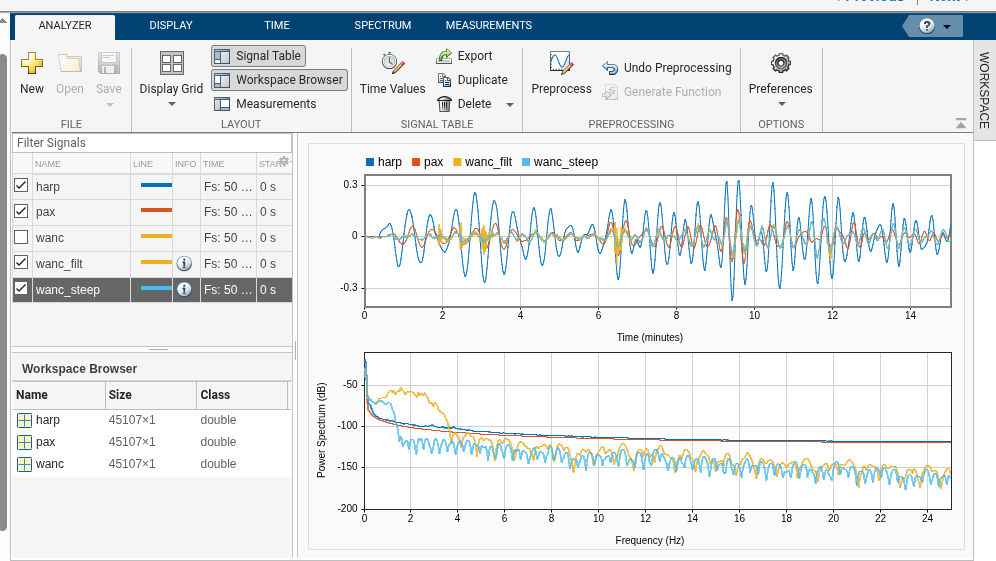
To see the surface waves in the WANC signal clearly, we filter out everything above 0.1 Hz.
1
2
% Lowpass filter at 0.1 Hz
wanc_filt = lowpass(wanc, 0.1, fs);
If the result is still “jagged,” increasing the steepness (e.g., to 0.95) can produce a smoother signal that matches the HARP and PAX recordings.
Bandpass Filtering
To isolate the local earthquakes, we use a bandpass filter targeting the 2–10 Hz range.
1
2
% Bandpass filter for local earthquake frequencies
wanc_bandpass = bandpass(wanc, [2 10], fs);
Correlating Events
By comparing the lowpass signal (surface waves) and the bandpass signal (local tremors), we can see a clear correlation: high-frequency pulses occur shortly after the peaks of the large-amplitude surface waves.
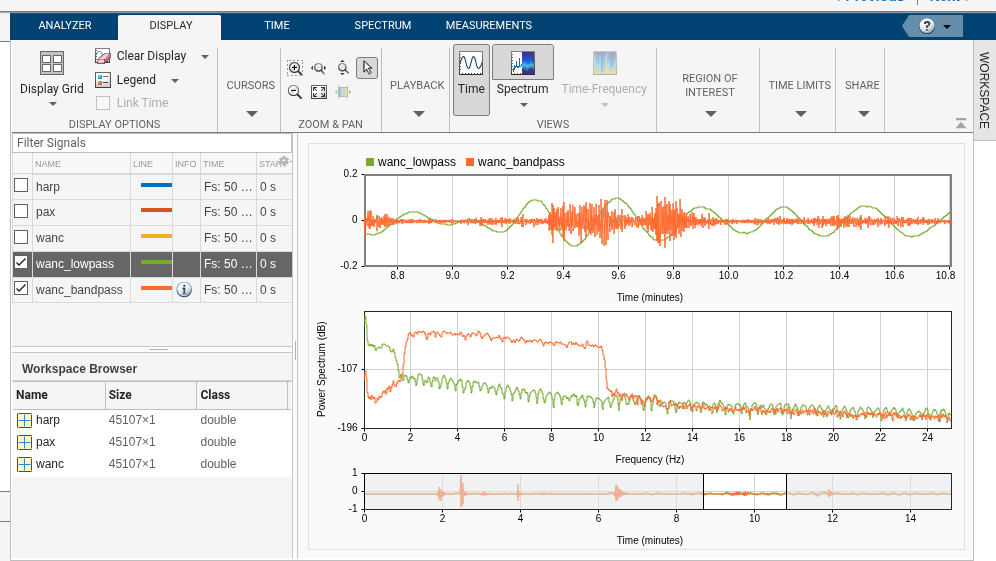
This proves that the massive Sumatra earthquake actually triggered smaller, local earthquakes in Alaska! In the final part, we’ll look at how to measure these events programmatically.